What this answers. How much burden each respondent experienced, after fielding, and where in the survey it fell.
What you need. The .qsf of the survey
version that collected the data, and the response data (API or CSV
export).
What it cannot establish. Respondent burden is the GfS+ score of what the survey displayed. It does not measure reading time, effort as perceived, or how much of a question was completed.
library(surveyBurden)
#>
#>                   .-- Q2 -- Q3 --.
#>   survey -- Q1 --+               +-- Burden 0.2.0
#>                   '-- Q4 --------'
#>
#> An R package for assessing the response-burden of web surveys
#> Docs: https://pmpk20.github.io/surveyBurden/
#>
#> Please cite: King P (2026). surveyBurden: An R package for assessing
#> the response-burden of web surveys. R package version 0.2.0,
#> https://github.com/pmpk20/surveyBurden.
#> Use citation("surveyBurden") for BibTeX.
burden_report() describes a survey before
fieldwork, from its design alone. Once responses are collected,
respondent_burden() gives the respondent
burden: the GfS+ points of every item the survey displayed to
each respondent.
It walks the survey flow against each respondent’s own answers, in flow order, evaluating branch logic and every question’s display logic. An item counts when the survey displayed it, so:
- descriptive text counts;
- a question displayed but left blank counts in full: skipping a question is item non-response, not a lighter survey;
- a partly answered matrix counts in full;
- each Loop & Merge iteration counts separately;
- for a respondent who broke off, burden runs up to the block they left in.
Getting the data
respondent_burden() needs two inputs: the QSF (survey
definition) and the responses. The most reliable source for the
responses is the raw CSV export: its ImportId row names each column’s
question, so columns are matched even when the survey uses custom export
tags. Both can also come from the Qualtrics API.
Via the API
library(surveyBurden)

# 1. Fetch the QSF (survey structure)
qsf <- fetch_qsf("SV_xxxxxxxxxx")

# 2. Fetch responses via qualtRics
responses <- qualtRics::fetch_survey(
  surveyID      = "SV_xxxxxxxxxx",
  label         = FALSE,    # numeric recode values, not choice text
  convert       = FALSE,    # keep raw strings
  import_id     = TRUE,     # name columns by question id (QID5, QID5_1, ...)
  force_request = TRUE      # bypass qualtRics cache
)

# 3. Compute respondent burden
rb <- respondent_burden(qsf, responses)
rb
The label = FALSE and convert = FALSE
arguments are important: they ensure column values are the raw numeric
recodes Qualtrics stores rather than labelled factor levels, which the
display logic is evaluated against. import_id = TRUE names
the columns by question id, so they match the QSF whatever export tags
the survey uses.
Both fetch_qsf() and
qualtRics::fetch_survey() need a Qualtrics API token. Find
yours in Qualtrics under Profile > Account Settings >
Qualtrics IDs (the API token row). See ?fetch_qsf
and vignette("qualtRics") from the qualtRics package for
setup.
Via CSV export (recommended)
You need two files: the response data (CSV) and the survey definition (QSF).
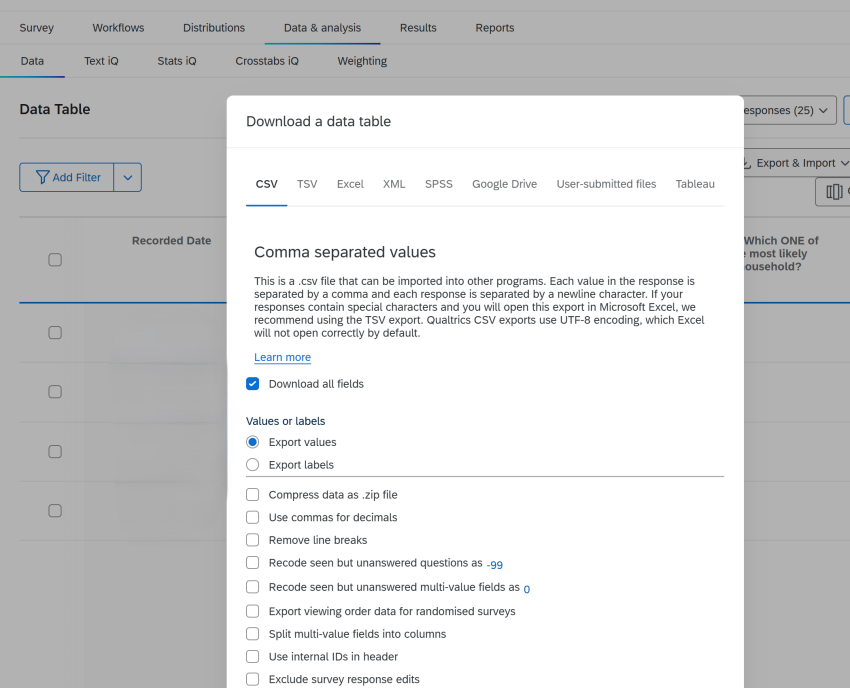
Export response data. In Qualtrics, go to the Data & analysis tab, then click Export & Import > Export Data. Select CSV, tick Export values (not labels), and click Download.
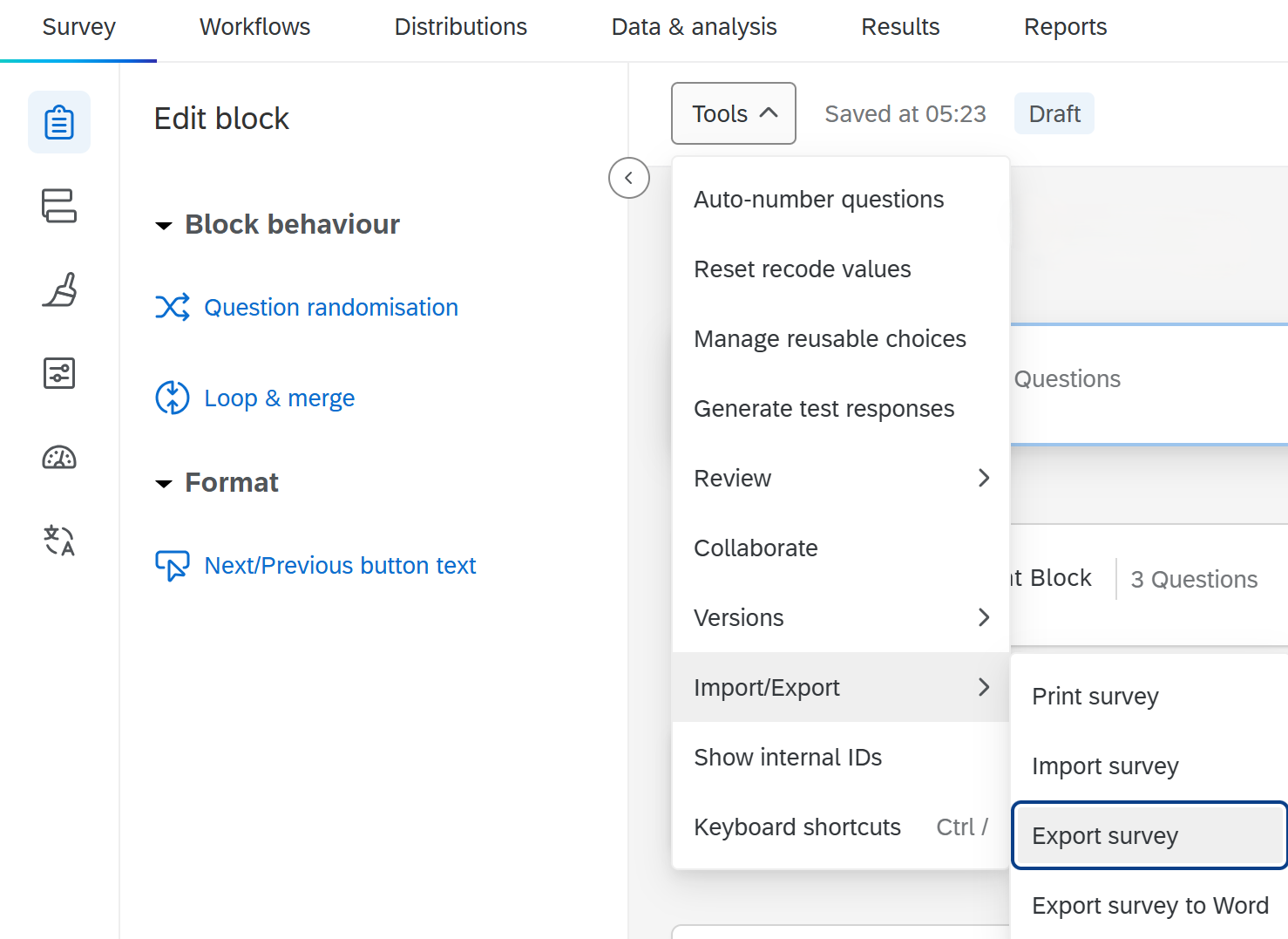
Export the QSF. In the Survey tab,
open Tools > Import/Export > Export survey. This
downloads the .qsf file that
respondent_burden() needs alongside the response data.
Then in R:
qsf <- read_qsf("my_survey.qsf")
rb <- respondent_burden(qsf, "my_responses.csv")   # the file path works directly
#> Removed 2 Qualtrics header rows (question labels / ImportId) from the top
#> of `responses`.
nrow(rb)   # should equal your number of respondents
A raw Qualtrics CSV export has two extra rows under the column names:
the question labels and the {"ImportId": ...} row.
respondent_burden() removes these when it can recognise
them – an ImportId cell, or a system column holding its own label
(ResponseId = “Response ID”) – and says so. It only looks
at the top rows and never guesses, so if you have edited the export
(renamed or dropped those columns), remove the header rows yourself
before scoring, and check that nrow(rb) matches your
respondent count.
Use the QSF exported from the survey version that collected the data: a later edit to the survey can change question ids and scoring.
An example
The example below simulates 400 respondents to the demo survey shipped with the package. Each answers every question the survey would display to them; some decline consent or live outside the study area and are screened out, and some break off part-way through.
qsf <- read_qsf(system.file("extdata", "demo_travel_survey.qsf",
                            package = "surveyBurden"))
`%||%` <- function(a, b) if (is.null(a)) b else a
sq <- surveyBurden:::index_questions(qsf)
simulate_respondent <- function(i) {
  a <- list(ResponseId = sprintf("R_%03d", i))
  pick <- function(qid) sample(names(sq[[qid]]$Choices), 1)
  for (qid in c("QID2", "QID3", "QID4", "QID5", "QID6", "QID10", "QID26"))
    a[[qid]] <- pick(qid)
  a$QID2 <- sample(c("1", "2"), 1, prob = c(0.95, 0.05))   # consent
  a$QID3 <- sample(c("1", "2"), 1, prob = c(0.9, 0.1))     # in study area
  for (r in names(sq$QID7$Choices)) a[[paste0("QID7_", r)]] <- pick("QID7")
  a$QID9 <- sample(c("1", "2", "3"), 1)                      # adults: loop count
  for (j in seq_len(as.integer(a$QID9))) {
    for (qid in c("QID11", "QID12")) a[[paste0(j, "_", qid)]] <- pick(qid)
    if (a[[paste0(j, "_QID11")]] != "6") a[[paste0(j, "_QID13")]] <- pick("QID13")
  }
  car <- runif(1) < 0.7
  a$QID14_1 <- if (car) "1" else NA
  a$QID14_4 <- if (runif(1) < 0.4) "1" else NA
  if (car) {
    a$QID15 <- sample(c("1", "2"), 1)   # export value (recode): vehicles
    for (j in seq_len(as.integer(a$QID15))) {
      a[[paste0(j, "_QID16")]] <- pick("QID16")
      if (a[[paste0(j, "_QID16")]] != "9") a[[paste0(j, "_QID17")]] <- pick("QID17")
      a[[paste0(j, "_QID18")]] <- "text"
    }
  }
  for (qid in c("QID19", "QID20", "QID21"))
    for (r in names(sq[[qid]]$Choices)) a[[paste0(qid, "_", r)]] <- pick(qid)
  if (a$QID6 %in% c("1", "2")) {                            # employed: Commuting
    a$QID23 <- pick("QID23")
    if (a$QID6 == "1" || a$QID23 != "1") a$QID22 <- pick("QID22")
    if (!is.null(a$QID22) && a$QID23 == "2") a$QID24 <- pick("QID24")
  }
  a$QID25 <- "text"
  # screened out: declined consent or outside the study area
  if (a$QID2 == "2") a <- a[c("ResponseId", "QID2")]
  else if (a$QID3 == "2") a <- a[c("ResponseId", "QID2", "QID3")]
  a
}
set.seed(1)
rows <- lapply(1:400, simulate_respondent)
cols <- unique(unlist(lapply(rows, names)))
sim <- as.data.frame(do.call(rbind, lapply(rows, function(r)
  vapply(cols, function(cc) as.character(r[[cc]] %||% NA), character(1)))))

# break-off: blank every answer after a randomly chosen block
blocks <- resolve_live_blocks(qsf)
q_block <- setNames(rep(blocks$flow_order, lengths(blocks$question_ids)),
                    unlist(blocks$question_ids))
col_block <- q_block[sub("_.*$", "", sub("^[0-9]+_", "", cols))]
quit_at <- ifelse(runif(400) < 0.3, sample(4:12, 400, replace = TRUE), Inf)
for (k in which(!is.na(col_block)))
  sim[[cols[k]]][quit_at < col_block[k]] <- NA
stopifnot(!anyNA(col_block[grepl("QID", cols)]))   # every answer has a block
screened <- is.na(sim$QID4)
sim$Finished <- as.integer(is.infinite(quit_at) | screened)
rb <- respondent_burden(qsf, sim)
head(rb[, c("response_id", "outcome", "points", "minutes",
            "items", "response_items", "pages")])
#> # A tibble: 6 × 7
#>   response_id outcome    points minutes items response_items pages
#>   <chr>       <chr>       <dbl>   <dbl> <int>          <int> <int>
#> 1 R_001       complete      107    8.92    23             22    11
#> 2 R_002       complete      116    9.67    28             27    13
#> 3 R_003       screen_out     12    1        2              1     2
#> 4 R_004       breakoff       41    3.42    15             14     7
#> 5 R_005       complete      109    9.08    24             23    12
#> 6 R_006       breakoff       32    2.67    10              9     5
Each row gives:
-
response_id– respondent identifier (auto-detected fromResponseId, or set withid_col). -
finishedandoutcome–"complete","breakoff"or"screen_out"(the flow ended the survey early). Qualtrics records a screened-out response as finished. -
points/minutes– respondent burden in GfS+ points, and at the scheme’s points-per-minute rate. -
items,response_items,pages– visible items displayed, those of them that take a response, and pages displayed. -
diagnostics –
furthest_order, and counts of logic the data could not settle (n_unresolved_items,n_unresolved_branches,unresolved_loops) or answers that contradict the flow (n_routing_conflicts).
Survey-level summaries
Summarise complete responses for survey-level statistics. Break-offs and screen-outs carry only part of the survey, so leave them out of the headline:
complete <- rb[rb$outcome == "complete", ]
quantile(complete$points, c(.1, .25, .5, .75, .9))
#>   10%   25%   50%   75%   90%
#> 102.8 107.0 113.0 118.0 123.0
hist(complete$points, breaks = 20, col = "#2166ac", border = "white",
     xlab = "Respondent burden (GfS+ points)",
     main = "Respondent burden, complete responses")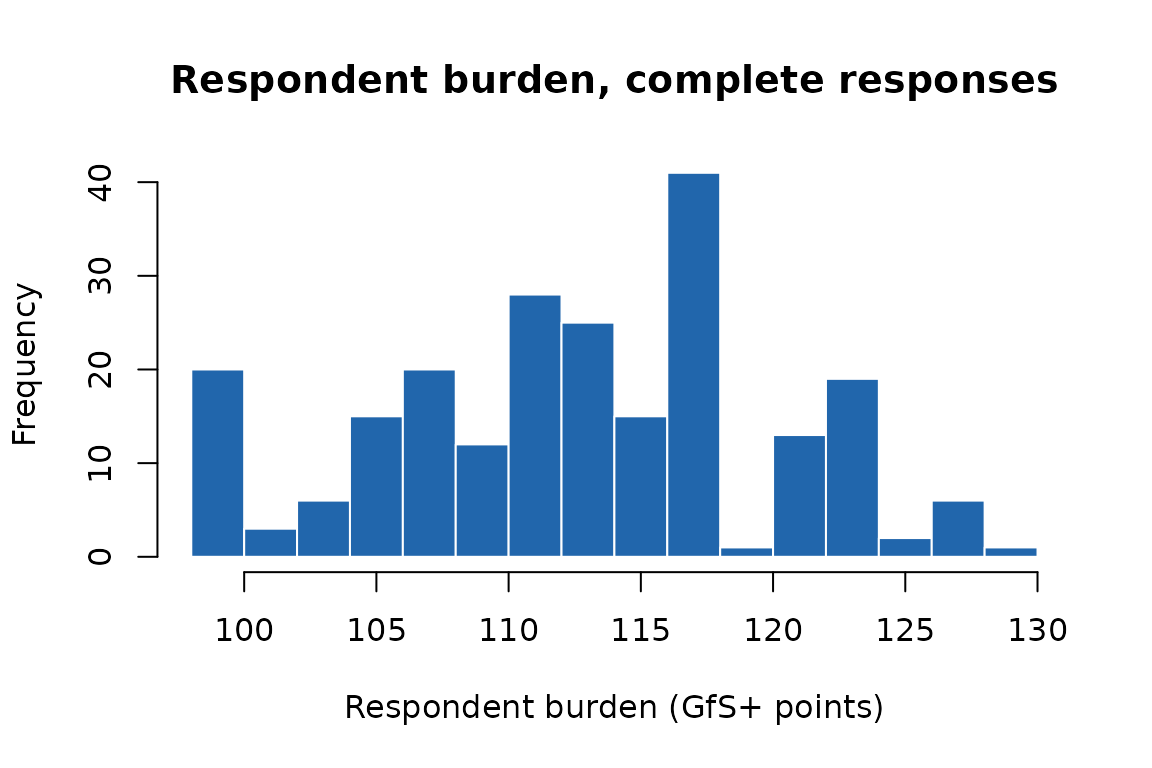
burden_report(qsf, responses = sim) adds the same
summary to the report, as $respondents, next to the
structural range.
With a fielded survey with thousands of respondents, this gives the full empirical distribution of burden – useful for reporting in papers and for calibrating future survey designs.
Column name mapping
The function maps response column names to QSF question IDs using these strategies, tried in order:
-
User-supplied
col_map– setattr(responses, "col_map")to a named list mapping column names to QIDs. An entry here overrides the automatic strategies for that column. - The ImportId row of a raw Qualtrics CSV export, which names each column’s question whatever the column is called.
-
Direct QID names – column is named
QID15,QID15_1, or1_QID15(loop iteration prefix). This is whatqualtRics::fetch_survey()produces by default. -
Export tags – column name matches a
DataExportTagfrom the QSF (e.g.Q15,TravelMode). Matching is case-insensitive, so lowercase columns from preprocessed exports also work.
A col_map is useful when working with response data that
has been renamed or reformatted. For example, if you have a dictionary
mapping custom column names to QIDs:
# dictionary has columns: column_name, qid
dict <- read.csv("my_dictionary.csv")
col_map <- setNames(as.list(dict$qid), dict$column_name)
attr(responses, "col_map") <- col_map
rb <- respondent_burden(qsf, responses)
For questions inside a Loop & Merge block, each column must also
carry its loop iteration, or answers from different iterations are
merged into one. Either keep an N_ prefix on the column
name (2_adults_age is iteration 2), or give the iteration
in the map:
Burden by block
by = "block" returns one row per respondent per block:
whether the flow routed them into it, and the burden displayed
there.
ex <- respondent_burden(qsf, sim, by = "block")
ex[ex$response_id == "R_001",
   c("block_name", "routed_in", "displayed", "iterations", "points")]
#> # A tibble: 12 × 5
#>    block_name      routed_in displayed iterations points
#>    <chr>           <lgl>     <lgl>          <int>  <dbl>
#>  1 Welcome         TRUE      TRUE              NA     11
#>  2 Consent         TRUE      TRUE              NA      1
#>  3 Area check      TRUE      TRUE              NA      2
#>  4 About you       TRUE      TRUE              NA     15
#>  5 Household       TRUE      TRUE              NA      3
#>  6 Other adults    TRUE      TRUE               1      5
#>  7 Vehicles        TRUE      TRUE              NA     13
#>  8 Vehicle details TRUE      TRUE               1      6
#>  9 Travel          TRUE      TRUE              NA     26
#> 10 Attitudes       TRUE      TRUE              NA     18
#> 11 Commuting       FALSE     FALSE             NA      0
#> 12 Closing         TRUE      TRUE              NA      7
routed_in is FALSE for a block the flow
skipped and NA for blocks after a respondent’s exit, where
the routing depends on answers that were never given.
displayed is FALSE for a block routed into
whose every question was hidden: Qualtrics skips such a block, so nobody
can break off in it. attr(ex, "respondents") holds each
respondent’s outcome and counts of any logic the data could not settle
(an unsupported literal, or an embedded field set by question JavaScript
and absent from the export), which fall back to whether the respondent
answered.
Modelling break-off
exposure_person_period() keeps the blocks each
respondent was at risk in (routed in and displayed, plus the block they
left in) and adds the burden already displayed before each block. Two
discrete-time hazard models then follow in a few lines: does a block’s
own burden predict leaving in it, and, comparing respondents in the same
block, does the burden accumulated so far?
pp <- exposure_person_period(ex)
pp[pp$response_id == "R_001",
   c("block_name", "period", "event", "points_before", "block_points")]
#> # A tibble: 11 × 5
#>    block_name      period event points_before block_points
#>    <chr>            <int> <int>         <dbl>        <dbl>
#>  1 Welcome              1     0             0           11
#>  2 Consent              2     0            11            1
#>  3 Area check           3     0            12            2
#>  4 About you            4     0            14           15
#>  5 Household            5     0            29            3
#>  6 Other adults         6     0            32            5
#>  7 Vehicles             7     0            37           13
#>  8 Vehicle details      8     0            50            6
#>  9 Travel               9     0            56           26
#> 10 Attitudes           10     0            82           18
#> 11 Closing             11     0           100            7

m_block <- glm(event ~ I(block_points / 10), family = binomial, data = pp)
m_accum <- glm(event ~ I(points_before / 100) + factor(block_name),
               family = binomial, data = pp)
round(coef(summary(m_block)), 3)
#>                    Estimate Std. Error z value Pr(>|z|)
#> (Intercept)          -4.035      0.174 -23.179        0
#> I(block_points/10)    0.588      0.117   5.045        0
round(coef(summary(m_accum))[2, , drop = FALSE], 3)
#>                      Estimate Std. Error z value Pr(>|z|)
#> I(points_before/100)   -0.016      1.923  -0.008    0.993
The simulated respondents left at a block drawn at random, not in response to burden, so these estimates illustrate the workflow and say nothing about burden itself. With a fielded survey, cluster the standard errors by respondent, and keep in mind how few blocks there are when reading block-level effects.
Some decisions are reported rather than hidden:
-
Exit block. By default the exit is the last block
with an answer, so someone who leaves on a newly displayed page without
answering is attributed to the previous block. Pass a last-seen block or
question column (
furthest = "column",furthest_col = ...) when the export has one. -
Loop iterations come from the question driving the
loop when it was answered, else from the iterations with answers
(
loop_iterations = "observed"forces the latter). -
Answers contradicting the flow (answers in a block
the flow skipped) are trusted and counted in
n_routing_conflicts.
Next
-
vignette("calibration")– checking respondent burden against completion times. -
vignette("paths-and-display-logic")– the structural burden range before fieldwork.